
Is a flatbed cutting plotter right for you?
A flatbed cutting plotter holds material flat on a table while the cutting head travels over it — the opposite of a roll-fed plotter, where the material moves under a fixed head. That single difference makes flatbeds the right choice for sheets, cards, thick boards, and printed pieces that must not bend. If your work comes in sheets or rigid stock, go flatbed. If it comes on rolls, a standard plotter is simpler and cheaper.
| Your cutting work | Right machine |
|---|---|
| Printed stickers on A3 and larger sheets | Flatbed plotter with camera registration |
| Thick board boxes, cards, packaging prototypes | Flatbed with strong force and crease tool |
| Cardstock, photo paper, label sheets, gift items | Flatbed plotter |
| Vinyl by the roll, HTV, long banner strips | Roll-fed cutting plotter |
Sheet precision
Material never bends or drifts.
Camera print & cut
Cuts printed sheets exactly on contour.
Rigid stock
Boards and thick sheet cut with force.
What Is a Flatbed Cutting Plotter?
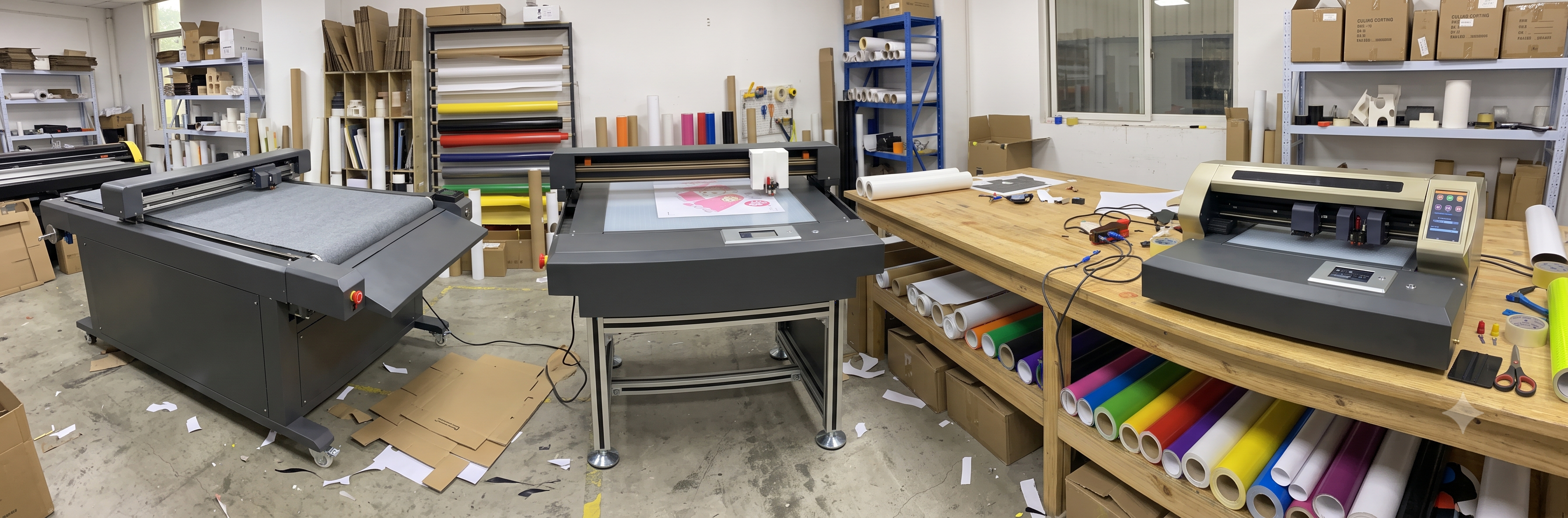
The head moves, the material does not
On a roll-fed plotter, pinch rollers and a grit shaft feed material forward under a fixed carriage. A flatbed cutting plotter flips that: the sheet lies flat on a table, held in place by vacuum, and the cutting head rides a moving gantry over it. Nothing bends, nothing slips, and every cut lands exactly where the file says — even at the sheet's far corners.
- Vacuum table holds the sheet perfectly flat through the whole job
- Full-width gantry covers the entire bed, edge to edge
- Handles thick and rigid stock a roll plotter cannot feed
- Camera registration cuts printed sheets on exact contour
- Sheet workflow: load, cut, unload — no rolls to unwind or re-tension
Tooling is familiar: the same 2 mm blade family, creasing tips, and pens used on roll plotters, carried by one or more tool stations on the gantry. The bed size — not the roll width — defines what you can run.
Best for: digital printers, card and gift makers, packaging studios, and sticker shops working from printed sheets.
How the Vacuum Table and Camera Registration Work
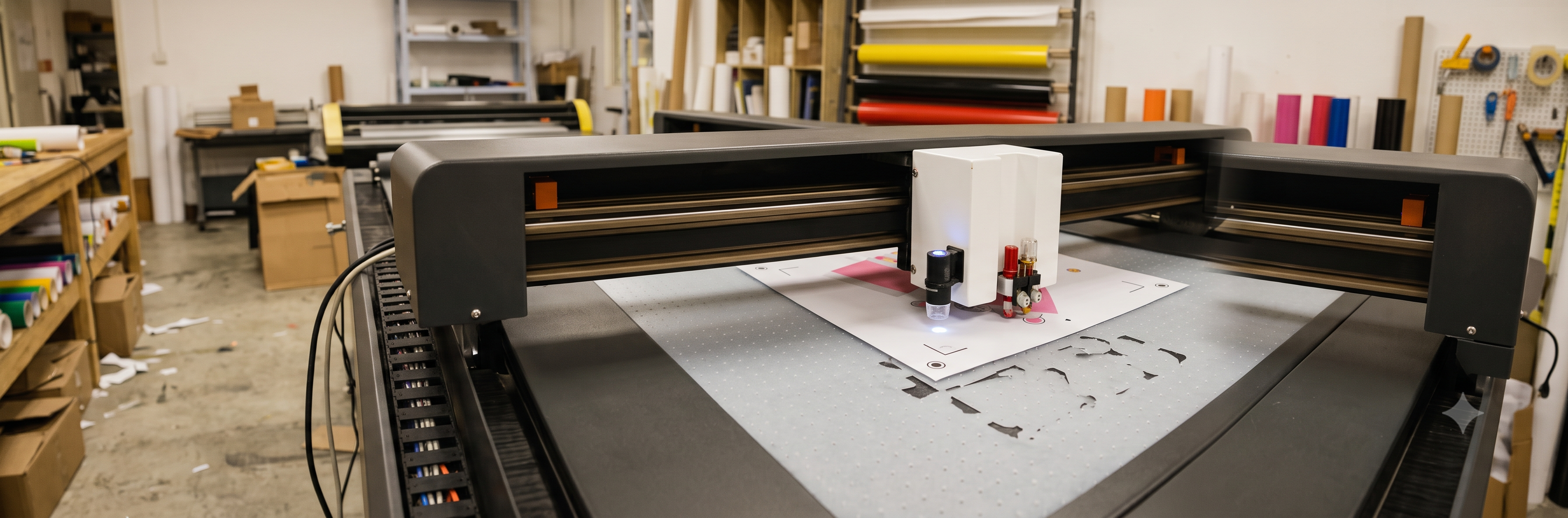
Two systems that define a flatbed
The vacuum and the camera are what separate a flatbed from a plain drawing table. Both are simple, and both matter daily.
- Vacuum table: a perforated bed connected to a pump. Switch it on, and the sheet pulls down tight against the surface. Even a light sheet cannot shift mid-job — which is why flatbeds hold alignment across hundreds of small cuts on one sheet.
- Camera registration: a camera on the gantry reads registration marks printed around the artwork. The software measures exactly where the print sits — including skew and stretch from printing — and warps the cut paths to match. The blade follows the printed shapes, not the sheet edges.
Together they solve the classic print and cut problem: printers never place images identically on every sheet. On a flatbed with a camera, a slightly crooked print still gets a perfectly aligned contour cut. Manual alignment and outer-margin guesses disappear.
Workflow note: print with your marks on, place the sheet on the vacuum bed, let the camera scan, and cut. One sheet takes seconds to register — and repeat jobs register even faster.
Best for: any shop that prints first and cuts second.
What You Can Make With a Flatbed Cutting Plotter
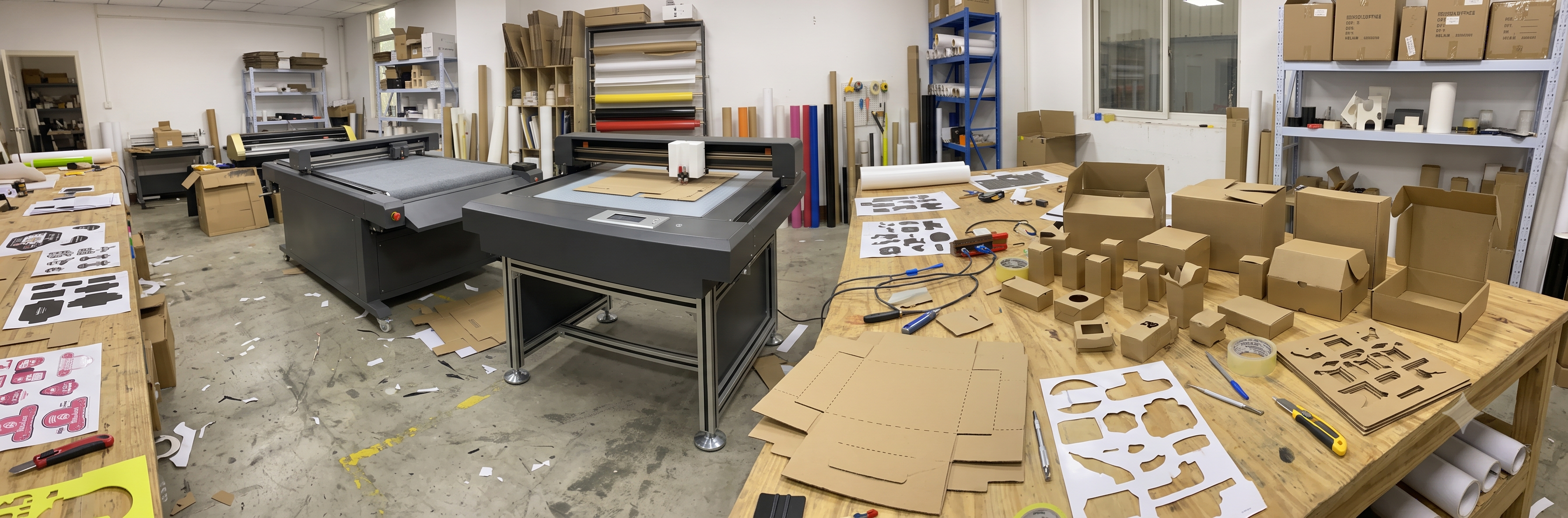
Where flatbeds earn
Flatbeds sit naturally next to a digital printer. Everything the printer outputs in sheets, the flatbed finishes.
- Printed sticker sheets: contour-cut A3 and larger printed sheets with camera accuracy — kiss-cut and through-cut in the same run
- Die-cut cards and gift items: greeting cards, cake toppers, tags, and invitation cutouts from cardstock
- Box and packaging prototypes: cut and crease board samples before committing to a die
- Label sheets: product and pharma-style label contours from printed sheets
- Thick stock jobs: foam board, corrugated, and rigid sheets that cannot pass through a roll plotter
- Short-run die-less work: any shape from a file — no die cost per design change
Material range: paper, cardstock, adhesive sheets, photo paper, label stock, light duplex, foam board, and thin plastics depending on the machine's force. Test your heaviest regular material at the demo.
Best for: print shops finishing sheet work in-house, and makers of cards, labels, and packaging samples.
Specs that matter on a flatbed cutting plotter
Bed size, hold-down, and registration decide the fit. Check these before comparing prices.
| Spec | Why it matters | What to check |
|---|---|---|
| Bed size | The largest sheet you can run end to end | Common: A3 / 600×400, 600×900, and larger beds — match your print output |
| Vacuum hold | Sheets must not shift mid-job | Test with your lightest and heaviest regular sheet |
| Camera registration | Print and cut accuracy | Essential for printed work — ask for a demo on a skewed print |
| Cutting force | Board and rigid stock thickness | Enough headroom above the force that cuts your thickest stock |
| Tool options | Cut, crease, kiss-cut, and draw from one machine | Blade holders, creasing tips, and pen holders available for the gantry |
Quick rules
- Bed size beats everything: a sheet bigger than the bed means offcuts and lost productivity.
- Vacuum pumps need cleaning and filter checks — ask what maintenance the table expects.
- Camera systems vary in speed and accuracy — watch it register and cut your own printed sheet, not a demo file.
- Blades, cutting strips, and vacuum pump parts should be stocked locally by your supplier.
Flatbed vs roll-fed cutting plotter
| Feature | Flatbed plotter | Roll-fed plotter |
|---|---|---|
| Material form | Sheets and rigid stock | Rolls and long vinyl |
| Thick material | Yes — board, foam, rigid sheets | Limited to what feeds through rollers |
| Print and cut on sheets | Camera registration, exact contour | ARMS eye on roll-printed media |
| Long continuous runs | Sheet by sheet | Uninterrupted metres |
| Alignment across the sheet | Vacuum holds flat — no drift | Good, but depends on feed and rollers |
| Footprint and price | Larger, higher | Smaller, lower |
| Best for | Print finishing, cards, board work | Vinyl production, HTV, banners |
The practical pairing: many busy shops run both — a roll plotter for vinyl and HTV production, and a flatbed beside the printer for sheet finishing. If you must choose one, let your material form decide: rolls → roll plotter, sheets → flatbed.
Flatbed cutting plotters available in India
Flatbeds come in bed-size classes. Match the bed to your printer's largest output sheet.
| Class | Bed size | Typical flatbed work |
|---|---|---|
| Compact flatbed | ~A3 / 600×400 mm | Sticker sheets, cards, gift items, label stock |
| Mid flatbed | ~600×900 mm | Large sticker sheets, packaging samples, multi-up layouts |
| Wide flatbed | Larger formats | Full display boards, signage sheets, high-volume finishing |
What to check before you buy
- Bed size matched to your printer's largest output — no trimming before cutting
- Vacuum hold tested on your own lightest and heaviest sheets
- Camera registration demonstrated on a deliberately skewed print
- Force headroom tested on your thickest regular board
- Crease tools and pen holders available if box and sample work is planned
- Blades, strips, and vacuum pump spares stocked locally
- Software that imports your print files directly and nests multiple jobs per sheet
A simple start: a compact A3-class flatbed with camera registration sits beside most digital printers and covers sticker sheets, cards, and label finishing. Step up in bed size when multi-up nesting and board work become regular.
How to choose and set up a flatbed cutting plotter
- Confirm the material form. Sheet and rigid stock point to flatbed. Roll vinyl and HTV point to a roll plotter. Mixed shops plan for both.
- Match the bed to your prints. The bed must take your largest output sheet without pre-trimming.
- Test the vacuum. Lay your lightest sheet — it should hold dead flat with the pump on.
- Test the camera. Print your own file with marks, place it slightly crooked, and watch the flatbed register and contour-cut it accurately.
- Test the force. Cut and crease your heaviest board, then weed a corner to check clean edges.
- Build the workflow. Set up your top five jobs as templates — sheet presets, tool settings, and nesting — so operators run them in minutes.
- Plan the maintenance. Vacuum filters, blades, strips, and camera cleanliness keep registration honest — schedule monthly checks from day one.